- Published on
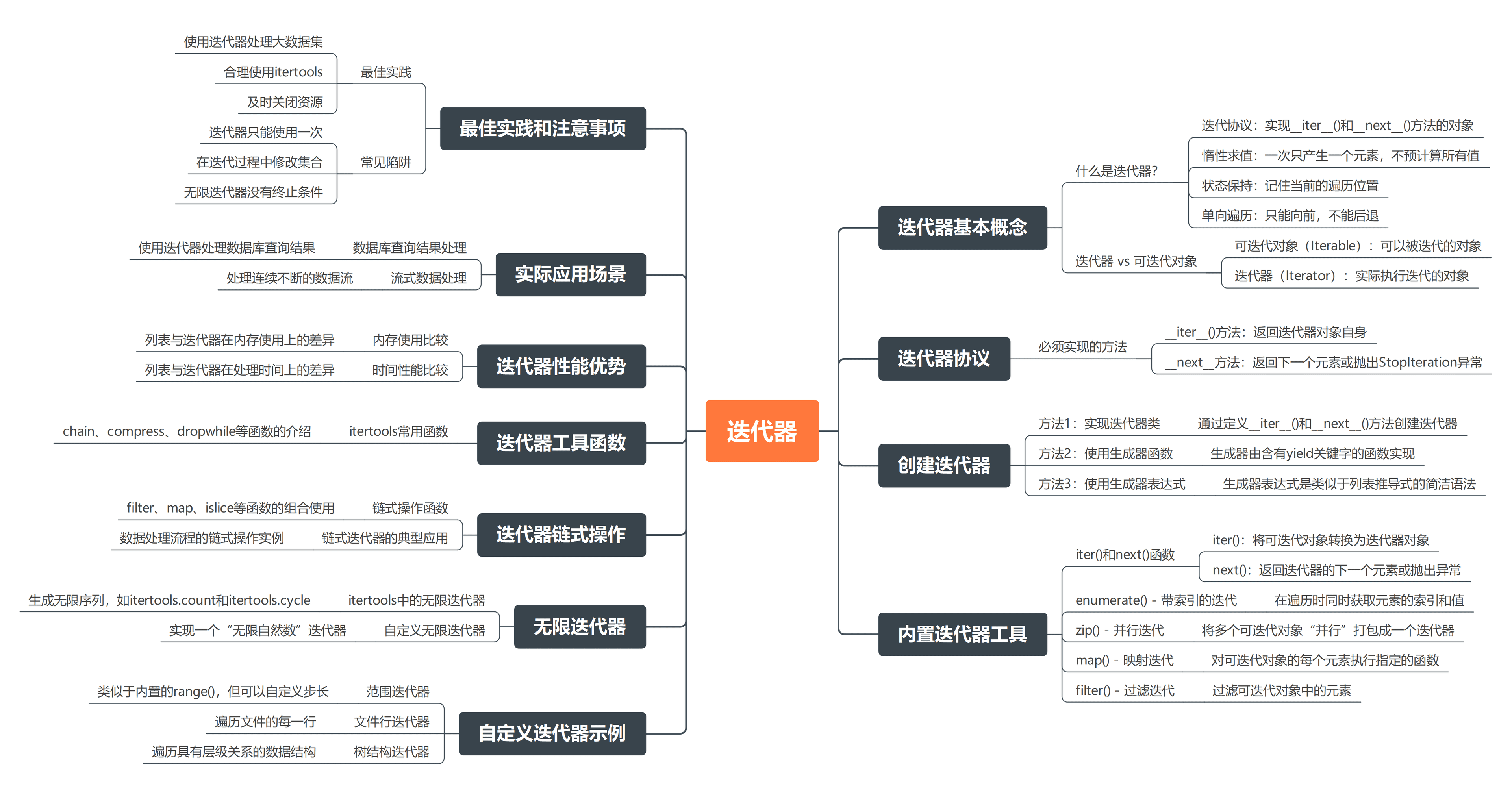
3.4.迭代器
- Authors

- Name
- xiaobai
1.基本概念
迭代器是 Python 中用于遍历数据集合的工具,它提供了一种统一、高效的方式来访问各种数据结构中的元素。
1.1.什么是迭代器?
迭代器是一个实现了迭代协议的对象,具有以下特征:
- 迭代协议:必须实现
__iter__()和__next__()方法__iter__():返回迭代器对象本身,使对象可以被iter()调用__next__():返回下一个元素,如果没有更多元素则抛出StopIteration异常
- 惰性求值:按需生成元素,不预计算所有值,节省内存
- 状态保持:记住当前的遍历位置
- 单向遍历:只能向前遍历,不能后退或重复
1.2.迭代器 vs 可迭代对象
理解迭代器和可迭代对象的区别很重要:
- 可迭代对象 (Iterable):可以被迭代的对象,如列表、元组、字符串等
- 迭代器 (Iterator):实际执行迭代的对象,实现了
__next__()方法
from collections.abc import Iterable, Iterator

# 列表是可迭代对象,但不是迭代器
numbers = [1, 2, 3]
print(isinstance(numbers, Iterable))  # True
print(isinstance(numbers, Iterator))  # False

# 通过 iter() 获取迭代器
numbers_iterator = iter(numbers)
print(isinstance(numbers_iterator, Iterator))  # True
重要说明:
- 可迭代对象可以通过
iter()函数转换为迭代器 - 迭代器只能使用一次,遍历完后需要重新创建
- 大多数内置容器类型(如 list、tuple、dict)都是可迭代对象,但不是迭代器
2.迭代器协议
迭代器协议是 Python 中定义迭代器行为的标准,任何对象只要实现了这个协议,就可以被用于迭代。
2.1.必须实现的方法
要成为一个合格的迭代器,必须实现以下两个方法:
__iter__()方法- 返回迭代器对象自身
- 使对象可以被
for循环或iter()调用 - 通常实现为
return self
__next__()方法- 返回下一个元素
- 如果没有更多元素,必须抛出
StopIteration异常 - 这是迭代器的核心逻辑
def __iter__(self):
    return self

def __next__(self):
    # 实现具体的迭代逻辑
    # 如果没有更多元素,抛出 StopIteration
    pass
协议特点:
- 任何实现了这两个方法的对象都可以用于
for循环 - 支持
next()函数调用 - 可以与
enumerate()、zip()等内置函数配合使用
2.2.完整示例
class MyIterator:
    """自定义迭代器示例"""
    def __init__(self, data):
        self.data = data
        self.index = 0

    def __iter__(self):
        """返回迭代器自身"""
        return self

    def __next__(self):
        """返回下一个元素"""
        if self.index >= len(self.data):
            raise StopIteration
        value = self.data[self.index]
        self.index += 1
        return value

# 使用自定义迭代器
my_iter = MyIterator([1, 2, 3])
for item in my_iter:
    print(item)  # 输出: 1, 2, 3

# 也可以手动调用 next()
my_iter2 = MyIterator(['a', 'b', 'c'])
print(next(my_iter2))  # 'a'
print(next(my_iter2))  # 'b'
print(next(my_iter2))  # 'c'
# print(next(my_iter2))  # 抛出 StopIteration 异常
3.创建迭代器的方法
3.1.方法1:实现迭代器类
通过定义一个类并实现迭代器协议来创建自定义迭代器:
class Countdown:
    """倒计时迭代器"""
    def __init__(self, start):
        self.current = start

    def __iter__(self):
        return self

    def __next__(self):
        if self.current <= 0:
            raise StopIteration
        value = self.current
        self.current -= 1
        return value

# 使用倒计时迭代器
countdown = Countdown(5)
for number in countdown:
    print(number, end=" ")  # 输出: 5 4 3 2 1
适用场景:
- 需要复杂的状态管理
- 需要实现特殊的迭代逻辑
- 需要封装复杂的迭代行为
3.2.方法2:使用生成器函数
生成器是一种特殊的迭代器,使用 yield 关键字创建,代码更简洁且内存效率更高:
def simple_gen():
    """简单的生成器函数"""
    print("First yield")
    yield 1
    print("Second yield")
    yield 2
    print("Done")

# 创建生成器对象
g = simple_gen()
print(next(g))  # 输出: First yield \n 1
print(next(g))  # 输出: Second yield \n 2
# print(next(g))  # 会引发 StopIteration 异常

# 生成器可以用 for 循环遍历
for value in simple_gen():
    print(f"Got: {value}")
生成器的优势:
- 代码更简洁,不需要实现
__iter__()和__next__()方法 - 自动管理状态,无需手动维护索引
- 内存效率高,按需生成值
- 支持复杂的控制流(如异常处理、资源管理)
3.3.方法3:使用生成器表达式
生成器表达式是创建迭代器最简洁的方式,语法类似列表推导式,但使用圆括号:
# 基本语法
(expression for item in iterable [if condition])
示例:
# 创建平方数生成器
squares = (x**2 for x in range(5))
print(list(squares))  # [0, 1, 4, 9, 16]

# 带条件的生成器表达式
even_squares = (x**2 for x in range(10) if x % 2 == 0)
print(list(even_squares))  # [0, 4, 16, 36, 64]

# 手动迭代
gen = (x * 2 for x in range(3))
print(next(gen))  # 0
print(next(gen))  # 2
print(next(gen))  # 4
# print(next(gen))  # StopIteration
生成器表达式的优势:
- 语法简洁,一行代码创建迭代器
- 内存效率高,惰性求值
- 适合简单的数据转换和过滤
- 可以与其他迭代器函数链式组合
4.内置迭代器工具
Python 提供了许多内置函数来操作迭代器,这些工具让迭代操作更加灵活和高效。
4.1.iter() 和 next() 函数
这两个函数是操作迭代器的基础工具:
iter(iterable):将可迭代对象转换为迭代器next(iterator):获取迭代器的下一个元素next(iterator, default):获取下一个元素,如果迭代结束则返回默认值
# 创建迭代器
numbers = [1, 2, 3, 4, 5]
iterator = iter(numbers)

# 手动获取元素
print(next(iterator))  # 1
print(next(iterator))  # 2
print(next(iterator))  # 3
print(next(iterator))  # 4
print(next(iterator))  # 5
# print(next(iterator))  # 抛出 StopIteration 异常

# 使用默认值避免异常
iterator2 = iter([1, 2])
print(next(iterator2))  # 1
print(next(iterator2))  # 2
print(next(iterator2, "没有更多元素"))  # 没有更多元素
使用场景:
- 需要精确控制迭代过程
- 处理大型数据集时避免一次性加载
- 实现自定义的迭代逻辑
4.2.enumerate() - 带索引的迭代
enumerate() 函数在遍历可迭代对象时同时提供索引和值,是处理需要索引的场景的最佳选择。
语法:
enumerate(iterable, start=0)
参数:
iterable:要遍历的可迭代对象start:索引起始值,默认为 0
返回值:返回 (索引, 元素) 元组的迭代器
# 基本用法
colors = ['red', 'green', 'blue']
for idx, color in enumerate(colors):
    print(f"{idx}: {color}")
# 输出:
# 0: red
# 1: green
# 2: blue

# 自定义起始索引
for idx, color in enumerate(colors, start=1):
    print(f"第{idx}个颜色: {color}")
# 输出:
# 第1个颜色: red
# 第2个颜色: green
# 第3个颜色: blue
常见应用场景:
- 需要同时访问索引和值的循环
- 创建带编号的输出
- 在循环中修改列表元素
- 生成带索引的数据结构
4.3.zip() - 并行迭代
zip() 函数将多个可迭代对象"并行"组合,每次迭代返回一个包含各对象对应元素的元组。
语法:
zip(iter1, iter2, ..., iterN)
特点:
- 返回迭代器,惰性求值
- 以最短的可迭代对象长度为准
- 支持任意数量的可迭代对象
# 基本用法
names = ['Alice', 'Bob', 'Charlie']
ages = [25, 30, 35]
cities = ['北京', '上海', '广州']

for name, age, city in zip(names, ages, cities):
    print(f"{name}, {age}岁, 来自{city}")
# 输出:
# Alice, 25岁, 来自北京
# Bob, 30岁, 来自上海
# Charlie, 35岁, 来自广州
长度不同的处理:
# 以最短的为准
list1 = [1, 2, 3, 4]
list2 = ['a', 'b']
for num, letter in zip(list1, list2):
    print(f"{num}: {letter}")
# 输出:
# 1: a
# 2: b
高级用法:
- 数据转置:
# 行转列
scores = [
    (85, 92, 78),  # 张三的成绩
    (76, 88, 95),  # 李四的成绩
    (90, 85, 92)   # 王五的成绩
]
chinese, math, english = zip(*scores)
print("语文成绩:", chinese)  # (85, 76, 90)
print("数学成绩:", math)     # (92, 88, 85)
print("英语成绩:", english)  # (78, 95, 92)
- 与推导式结合:
# 计算对应位置元素的和
list1 = [1, 2, 3]
list2 = [4, 5, 6]
result = [x + y for x, y in zip(list1, list2)]
print(result)  # [5, 7, 9]
- 处理不同长度的序列:
from itertools import zip_longest

# 保留所有元素,用默认值填充
a = [1, 2, 3]
b = [4, 5]
for x, y in zip_longest(a, b, fillvalue=0):
    print(f"{x} + {y} = {x + y}")
# 输出:
# 1 + 4 = 5
# 2 + 5 = 7
# 3 + 0 = 3
4.4.map() - 映射迭代
map() 函数对可迭代对象的每个元素应用指定函数,返回一个迭代器。
语法:
map(function, iterable, ...)
参数:
function:要应用的函数(可以是内置函数、lambda 或自定义函数)iterable:一个或多个可迭代对象
特点:
- 返回惰性迭代器,需要显式消费
- 支持多个可迭代对象,以最短的为准
- 适合批量数据转换
# 基本用法
numbers = [1, 2, 3, 4]
squared = map(lambda x: x ** 2, numbers)
print(list(squared))  # [1, 4, 9, 16]

# 类型转换
nums = [10, 20, 30]
str_list = map(str, nums)
print(list(str_list))  # ['10', '20', '30']

# 多序列处理
list1 = [1, 2, 3]
list2 = [4, 5, 6, 7]
result = map(lambda x, y: x + y, list1, list2)
print(list(result))  # [5, 7, 9]

# 自定义函数
def double(x):
    return x * 2

numbers = [5, 6, 7]
doubled = map(double, numbers)
print(list(doubled))  # [10, 12, 14]
优势:
- 代码简洁,函数式编程风格
- 惰性求值,内存效率高
- 易于与其他迭代器函数组合
4.5.filter() - 过滤迭代
filter() 函数根据指定条件过滤可迭代对象中的元素,只保留满足条件的元素。
语法:
filter(function, iterable)
参数:
function:判断函数,返回 True/False。如果为 None,则使用元素自身的布尔值iterable:要过滤的可迭代对象
特点:
- 返回惰性迭代器,需要显式消费
- 只保留使函数返回 True 的元素
- 适合数据清洗和条件筛选
# 基本用法
numbers = [1, 2, 3, 4, 5, 6]
even_numbers = filter(lambda x: x % 2 == 0, numbers)
print(list(even_numbers))  # [2, 4, 6]

# 过滤假值
data = ['hello', '', 'python', None, ' ', 'AI']
valid_data = filter(None, data)
print(list(valid_data))  # ['hello', 'python', ' ', 'AI']

# 自定义过滤函数
def is_positive(x):
    return x > 0

numbers = [0, -1, 2, -3, 4]
positive = filter(is_positive, numbers)
print(list(positive))  # [2, 4]

# 复杂条件
def is_valid_email(email):
    return email and '@' in email and '.' in email

emails = ['user@example.com', 'invalid', 'test@domain.org', '']
valid_emails = filter(is_valid_email, emails)
print(list(valid_emails))  # ['user@example.com', 'test@domain.org']
应用场景:
- 数据清洗和验证
- 条件筛选
- 去除无效数据
- 与 map() 等函数组合使用
5.自定义迭代器示例
5.1.范围迭代器
实现一个类似内置 range() 的自定义迭代器:
class RangeIterator:
    """自定义范围迭代器,类似内置的 range()"""

    def __init__(self, start, stop=None, step=1):
        # 处理单参数情况:range(5) -> start=0, stop=5
        if stop is None:
            self.start = 0
            self.stop = start
        else:
            self.start = start
            self.stop = stop
        self.step = step
        self.current = self.start

    def __iter__(self):
        return self

    def __next__(self):
        # 检查终止条件
        if (self.step > 0 and self.current >= self.stop) or \
           (self.step < 0 and self.current <= self.stop):
            raise StopIteration

        value = self.current
        self.current += self.step
        return value

# 使用示例
print("正步长:")
for i in RangeIterator(1, 5):
    print(i, end=" ")  # 输出: 1 2 3 4

print("\n负步长:")
for i in RangeIterator(5, 1, -1):
    print(i, end=" ")  # 输出: 5 4 3 2
实现要点:
- 支持正负步长
- 处理单参数和双参数情况
- 正确实现终止条件判断
5.2.文件行迭代器
实现一个安全的文件行迭代器,自动管理文件资源:
class FileLineIterator:
    """文件行迭代器,自动管理文件资源"""

    def __init__(self, filename):
        self.filename = filename
        self.file = None

    def __iter__(self):
        # 打开文件
        self.file = open(self.filename, 'r', encoding='utf-8')
        return self

    def __next__(self):
        if self.file is None:
            raise RuntimeError("必须先调用 __iter__ 方法")

        line = self.file.readline()
        if not line:  # 文件结束
            self.file.close()
            raise StopIteration

        return line.strip()

    def __del__(self):
        """确保文件被关闭"""
        if self.file and not self.file.closed:
            self.file.close()

# 使用示例
def process_file(filename):
    """处理文件内容"""
    for line in FileLineIterator(filename):
        if line:  # 跳过空行
            print(f"处理: {line}")

# 更安全的使用方式
def safe_process_file(filename):
    """更安全的文件处理方式"""
    try:
        with open(filename, 'r', encoding='utf-8') as file:
            for line in file:
                line = line.strip()
                if line:
                    print(f"处理: {line}")
    except FileNotFoundError:
        print(f"文件 {filename} 不存在")
    except Exception as e:
        print(f"处理文件时出错: {e}")

# 使用
process_file('example.txt')
改进建议:
- 使用
with语句更安全 - 添加异常处理
- 考虑使用生成器函数更简洁
5.3.树结构迭代器
实现一个树结构的前序遍历迭代器,用于处理层级数据:
class TreeNode:
    """树节点类"""
    def __init__(self, value):
        self.value = value
        self.children = []

    def add_child(self, child):
        self.children.append(child)

class TreeIterator:
    """树的前序遍历迭代器"""
    def __init__(self, root):
        self.stack = [root] if root else []

    def __iter__(self):
        return self

    def __next__(self):
        if not self.stack:
            raise StopIteration

        # 弹出当前节点
        node = self.stack.pop()

        # 将子节点逆序加入栈(保证前序遍历顺序)
        for child in reversed(node.children):
            self.stack.append(child)

        return node.value

# 构建示例树
#        A
#       / \
#      B   C
#     / \
#    D   E
root = TreeNode('A')
b = TreeNode('B')
c = TreeNode('C')
d = TreeNode('D')
e = TreeNode('E')

root.add_child(b)
root.add_child(c)
b.add_child(d)
b.add_child(e)

# 遍历树
print("前序遍历:")
for value in TreeIterator(root):
    print(value, end=" ")  # 输出: A B D E C
实现要点:
- 使用栈结构保存遍历状态
- 子节点逆序入栈保证前序遍历
- 支持任意深度的树结构
6.无限迭代器
6.1.itertools 中的无限迭代器
itertools 模块提供了多种无限迭代器,可以持续产生数据:
count(start=0, step=1):生成无限数字序列cycle(iterable):无限循环遍历可迭代对象repeat(object, times=None):重复指定对象
import itertools

# count - 无限计数器
counter = itertools.count(10, 2)
print("Count:", [next(counter) for _ in range(5)])  # [10, 12, 14, 16, 18]

# cycle - 循环遍历
cycler = itertools.cycle(['A', 'B', 'C'])
print("Cycle:", [next(cycler) for _ in range(6)])  # ['A', 'B', 'C', 'A', 'B', 'C']

# repeat - 重复元素
repeater = itertools.repeat('hello', 3)
print("Repeat:", list(repeater))  # ['hello', 'hello', 'hello']

# 无限重复
infinite = itertools.repeat('hello')
print("Infinite:", [next(infinite) for _ in range(3)])  # ['hello', 'hello', 'hello']
注意事项:
- 无限迭代器需要配合
islice()或手动计数使用 - 直接遍历会导致死循环
- 适合生成器模式和惰性计算
6.2.自定义无限迭代器
实现自定义无限迭代器,用于特定场景:
class InfiniteNumbers:
    """无限自然数迭代器"""
    def __init__(self, start=0):
        self.current = start

    def __iter__(self):
        return self

    def __next__(self):
        value = self.current
        self.current += 1
        return value

# 使用示例
numbers = InfiniteNumbers(5)
print([next(numbers) for _ in range(7)])  # [5, 6, 7, 8, 9, 10, 11]

# 配合 islice 使用
from itertools import islice
limited = islice(InfiniteNumbers(1), 10)
print(list(limited))  # [1, 2, 3, 4, 5, 6, 7, 8, 9, 10]
应用场景:
- 生成唯一序列号
- 轮询任务
- 持续数据采集
- 模拟无限数据流
注意事项:
- 必须配合限制条件使用
- 避免直接遍历导致死循环
- 考虑内存使用情况
7.迭代器链式操作
链式操作将多个迭代器函数串联起来,形成数据处理流水线,具有惰性求值优势。
7.1.常见链式操作函数
filter(func, iterable):过滤满足条件的元素map(func, iterable):对每个元素应用函数itertools.islice(iterable, n):取前n个元素
7.2.链式操作示例
import itertools

def process_data_pipeline(data):
    """数据处理流水线"""
    # 1. 过滤正数
    filtered = filter(lambda x: x > 0, data)
    # 2. 计算平方
    squared = map(lambda x: x ** 2, filtered)
    # 3. 取前5个
    limited = itertools.islice(squared, 5)
    return limited

# 示例数据
data = [-3, -2, -1, 0, 1, 2, 3, 4, 5, 6]
result = process_data_pipeline(data)
print(list(result))  # [1, 4, 9, 16, 25]

# 更简洁的写法
result = itertools.islice(
    map(lambda x: x ** 2, filter(lambda x: x > 0, data)), 5
)
print(list(result))  # [1, 4, 9, 16, 25]
优势:
- 内存效率:按需处理,不一次性加载所有数据
- 性能优化:只为需要的数据执行运算
- 代码简洁:易于组合复杂的数据处理逻辑
- 可读性强:流水线式的处理流程清晰明了
应用场景:
- 数据清洗和预处理
- 日志文件分析
- 流式数据处理
- 大数据集处理
8.迭代器工具函数
8.1.itertools 常用函数
itertools 模块提供了丰富的迭代器构造工具,支持流式数据处理:
chain(\*iterables):连接多个可迭代对象compress(data, selectors):根据布尔掩码选择元素dropwhile(predicate, iterable):丢弃开头满足条件的元素takewhile(predicate, iterable):获取开头满足条件的元素groupby(iterable, key=None):按key分组(需要先排序)
import itertools

# chain - 连接多个迭代器
chain_iter = itertools.chain([1, 2], [3, 4], [5, 6])
print("Chain:", list(chain_iter))  # [1, 2, 3, 4, 5, 6]

# compress - 条件过滤
data = ['A', 'B', 'C', 'D']
selectors = [1, 0, 1, 0]
compress_iter = itertools.compress(data, selectors)
print("Compress:", list(compress_iter))  # ['A', 'C']

# dropwhile - 丢弃开头满足条件的元素
drop_iter = itertools.dropwhile(lambda x: x < 5, [1, 2, 3, 4, 5, 6, 1, 2])
print("Dropwhile:", list(drop_iter))  # [5, 6, 1, 2]

# takewhile - 获取开头满足条件的元素
take_iter = itertools.takewhile(lambda x: x < 5, [1, 2, 3, 4, 5, 6, 1, 2])
print("Takewhile:", list(take_iter))  # [1, 2, 3, 4]

# groupby - 分组(需要先排序)
data = ['apple', 'animal', 'banana', 'bird', 'cherry', 'cat']
sorted_data = sorted(data, key=lambda x: x[0])  # 按首字母排序
grouped = itertools.groupby(sorted_data, key=lambda x: x[0])
for key, group in grouped:
    print(f"{key}: {list(group)}")
# 输出:
# a: ['animal', 'apple']
# b: ['banana', 'bird']
# c: ['cat', 'cherry']
优势:
- 惰性求值,内存效率高
- 函数式编程风格
- 易于组合复杂的数据处理逻辑
- 适合处理大数据集
9.迭代器性能优势
9.1.内存使用比较
import sys

def using_list_memory(n):
    """使用列表,占用大量内存"""
    return [i**2 for i in range(n)]

def using_iterator_memory(n):
    """使用迭代器,占用很少内存"""
    return (i**2 for i in range(n))

n = 1000000

# 内存使用比较
list_result = using_list_memory(n)
iter_result = using_iterator_memory(n)

print(f"列表内存使用: {sys.getsizeof(list_result)} 字节")
print(f"迭代器内存使用: {sys.getsizeof(iter_result)} 字节")
# 输出示例:
# 列表内存使用: 800984 字节
# 迭代器内存使用: 200 字节
9.2.性能优势总结
内存效率:
- 列表:一次性创建所有元素,占用大量内存
- 迭代器:按需生成元素,内存占用极小
处理速度:
- 列表:需要预先计算所有元素
- 迭代器:惰性求值,只计算需要的元素
适用场景:
- 大数据集处理
- 无限数据流
- 内存受限环境
- 流式数据处理
10.实际应用场景
10.1.数据库查询结果处理
class DatabaseQueryIterator:
    """数据库查询结果迭代器,支持分页处理"""

    def __init__(self, query, chunk_size=1000):
        self.query = query
        self.chunk_size = chunk_size
        self.current_chunk = []
        self.current_index = 0
        self.has_more = True

    def __iter__(self):
        return self

    def __next__(self):
        if self.current_index >= len(self.current_chunk):
            if not self.has_more:
                raise StopIteration
            self._fetch_next_chunk()

        if not self.current_chunk:
            raise StopIteration

        value = self.current_chunk[self.current_index]
        self.current_index += 1
        return value

    def _fetch_next_chunk(self):
        """获取下一批数据(模拟实现)"""
        import random
        if random.random() < 0.2:  # 20% 概率没有更多数据
            self.has_more = False
            self.current_chunk = []
        else:
            self.current_chunk = [f"record_{i}" for i in range(self.chunk_size)]
        self.current_index = 0

# 使用示例
query_iter = DatabaseQueryIterator("SELECT * FROM large_table")
for i, record in enumerate(query_iter):
    if i >= 5000:  # 限制处理数量
        break
    if i % 1000 == 0:
        print(f"处理第 {i} 条记录")
优势:
- 内存效率高,不会一次性加载所有数据
- 支持大数据集处理
- 可以随时停止处理
- 适合流式数据处理
10.2.流式数据处理
class StreamProcessor:
    """流式数据处理器"""

    def __init__(self, data_stream):
        self.data_stream = data_stream

    def filter_valid(self):
        """过滤有效数据"""
        return filter(lambda x: x is not None and x != '', self.data_stream)

    def transform_data(self):
        """转换数据"""
        return map(str.upper, self.filter_valid())

    def batch_process(self, batch_size=100):
        """批量处理"""
        batch = []
        for item in self.transform_data():
            batch.append(item)
            if len(batch) >= batch_size:
                yield batch
                batch = []
        if batch:
            yield batch

    def process(self):
        """处理流水线"""
        total_processed = 0
        for batch in self.batch_process(3):  # 小批量用于演示
            total_processed += len(batch)
            print(f"处理批次: {batch}")
        print(f"总共处理: {total_processed} 条记录")

def data_stream():
    """模拟数据流"""
    data = ['hello', '', 'world', None, 'python', 'stream', '', 'processing']
    for item in data:
        yield item

# 使用示例
processor = StreamProcessor(data_stream())
processor.process()
优势:
- 内存效率高,适合处理大数据流
- 支持批量处理,提高处理效率
- 易于扩展和组合
- 支持实时数据处理
11.最佳实践和注意事项
11.1.最佳实践
# 1. 使用迭代器处理大数据集
def process_large_data_correct():
    """正确处理大数据集"""
    # 正确:使用迭代器
    with open('large_file.txt', 'r') as file:
        for line in file:  # 文件对象本身就是迭代器
            process_line(line.strip())

    # 错误:一次性读取所有内容
    # with open('large_file.txt', 'r') as file:
    #     lines = file.readlines()  # 可能内存溢出
    #     for line in lines:
    #         process_line(line)

# 2. 合理使用 itertools
def efficient_combinations():
    """高效组合操作"""
    import itertools

    data = range(1000000)

    # 高效:链式操作
    result = itertools.islice(
        filter(lambda x: x % 2 == 0, data),
        100
    )
    return list(result)

# 3. 资源管理
class ResourceIterator:
    """正确管理资源的迭代器"""
    def __init__(self, resource):
        self.resource = resource

    def __iter__(self):
        return self

    def __next__(self):
        line = self.resource.readline()
        if line:
            return line
        else:
            raise StopIteration

    def __del__(self):
        """确保资源被释放"""
        if hasattr(self.resource, 'close'):
            self.resource.close()

# 更推荐的方式:使用 with 语句
def safe_file_processing(filename):
    """更安全的文件处理方式"""
    try:
        with open(filename, 'r') as file:
            for line in file:
                process_line(line.strip())
    except FileNotFoundError:
        print(f"文件 {filename} 不存在")
    except Exception as e:
        print(f"处理文件时出错: {e}")
最佳实践总结:
- 使用迭代器处理大数据集
- 合理使用 itertools 模块
- 及时关闭资源,优先使用 with 语句
- 避免在迭代过程中修改集合
- 使用 islice 限制无限迭代器
11.2.常见陷阱
import itertools

# 陷阱1: 迭代器只能使用一次
numbers = [1, 2, 3]
iterator = iter(numbers)
print(list(iterator))  # [1, 2, 3]
print(list(iterator))  # [] - 空的!

# 陷阱2: 在迭代过程中修改集合
numbers = [1, 2, 3, 4, 5]
try:
    for num in numbers:
        if num == 3:
            numbers.remove(num)  # 危险!
except RuntimeError as e:
    print(f"错误: {e}")

# 陷阱3: 无限迭代器没有终止条件
infinite = itertools.count()
# for i in infinite:  # 这将永远运行
#     print(i)

# 正确做法:使用 islice 限制
limited = itertools.islice(infinite, 5)
print(list(limited))  # [0, 1, 2, 3, 4]

# 陷阱4: 忘记处理 StopIteration 异常
def manual_iteration():
    numbers = [1, 2, 3]
    iterator = iter(numbers)
    while True:
        try:
            value = next(iterator)
            print(value)
        except StopIteration:
            break

# 陷阱5: 在生成器中使用 return 而不是 yield
def wrong_generator():
    for i in range(3):
        return i  # 错误!应该使用 yield

def correct_generator():
    for i in range(3):
        yield i  # 正确
避免陷阱的方法:
- 理解迭代器的单向性
- 避免在迭代过程中修改集合
- 使用 islice 限制无限迭代器
- 正确处理 StopIteration 异常
- 在生成器中使用 yield 而不是 return