- Published on
2.13.运算符
- Authors

- Name
- xiaobai
1.运算符分类
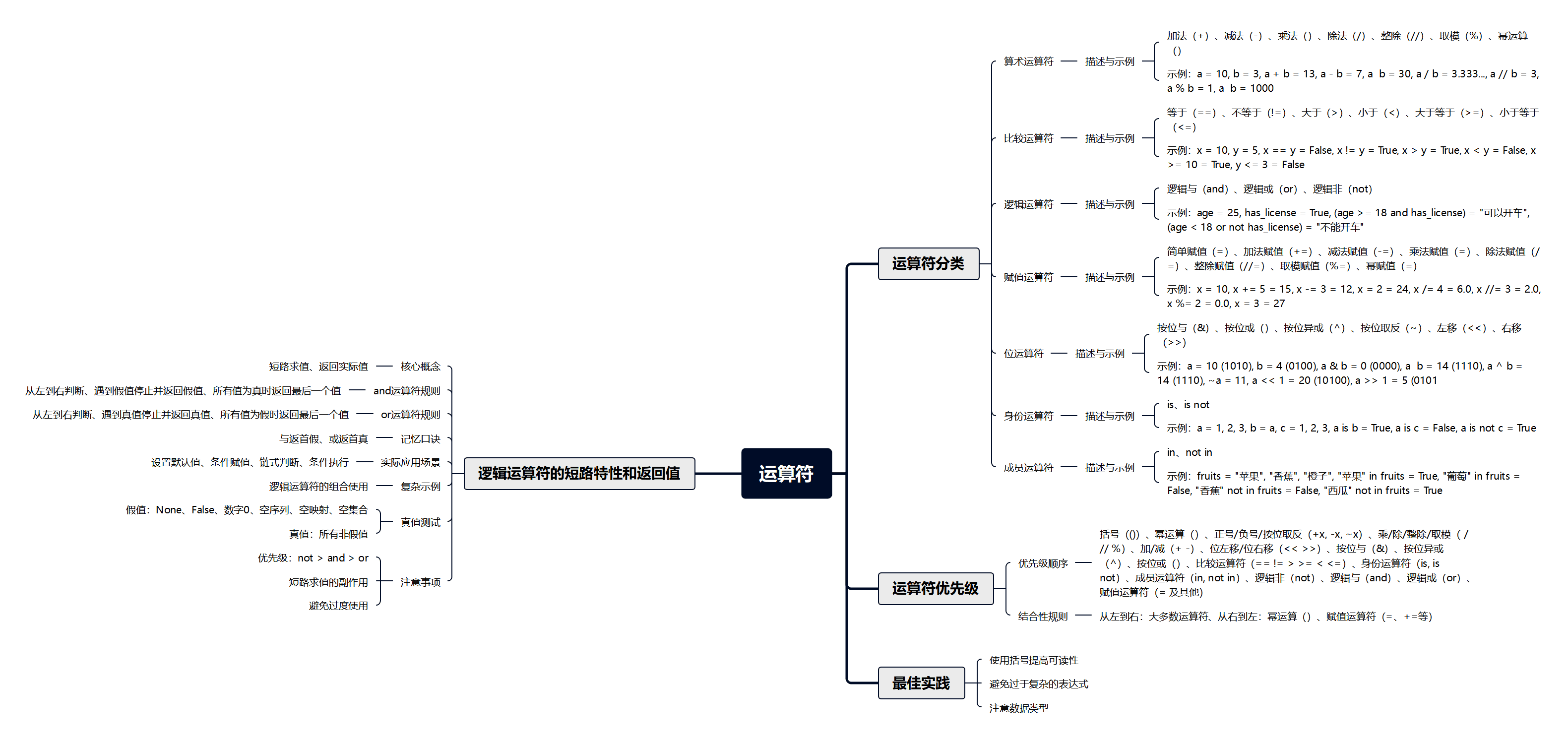
Python 运算符可以分为以下几大类:
- 算术运算符
- 比较运算符
- 逻辑运算符
- 赋值运算符
- 位运算符
- 身份运算符
- 成员运算符
2.算术运算符
| 运算符 | 描述 | 示例 | 结果 |
|---|---|---|---|
+ | 加法 | 5 + 3 | 8 |
- | 减法 | 5 - 3 | 2 |
* | 乘法 | 5 * 3 | 15 |
/ | 除法 | 5 / 2 | 2.5 |
// | 整除 | 5 // 2 | 2 |
% | 取模 | 5 % 2 | 1 |
** | 幂运算 | 2 ** 3 | 8 |
a = 10
b = 3

print(a + b)   # 13
print(a - b)   # 7
print(a * b)   # 30
print(a / b)   # 3.333...
print(a // b)  # 3
print(a % b)   # 1
print(a ** b)  # 1000
3.比较运算符
| 运算符 | 描述 | 示例 | 结果 |
|---|---|---|---|
== | 等于 | 5 == 3 | False |
!= | 不等于 | 5 != 3 | True |
> | 大于 | 5 > 3 | True |
< | 小于 | 5 < 3 | False |
>= | 大于等于 | 5 >= 5 | True |
<= | 小于等于 | 5 <= 3 | False |
x = 10
y = 5

print(x == y)   # False
print(x != y)   # True
print(x > y)    # True
print(x < y)    # False
print(x >= 10)  # True
print(y <= 3)   # False
4.逻辑运算符
| 运算符 | 描述 | 示例 | 结果 |
|---|---|---|---|
and | 逻辑与 | True and False | False |
or | 逻辑或 | True or False | True |
not | 逻辑非 | not True | False |
a = True
b = False

print(a and b)  # False
print(a or b)   # True
print(not a)    # False
print(not b)    # True

# 实际应用
age = 25
has_license = True

if age >= 18 and has_license:
    print("可以开车")
else:
    print("不能开车")
5.赋值运算符
| 运算符 | 描述 | 等价于 |
|---|---|---|
= | 简单赋值 | x = 5 |
+= | 加法赋值 | x += 3 → x = x + 3 |
-= | 减法赋值 | x -= 3 → x = x - 3 |
*= | 乘法赋值 | x *= 3 → x = x * 3 |
/= | 除法赋值 | x /= 3 → x = x / 3 |
//= | 整除赋值 | x //= 3 → x = x // 3 |
%= | 取模赋值 | x %= 3 → x = x % 3 |
**= | 幂赋值 | x **= 3 → x = x ** 3 |
# = 简单赋值
x = 10
print(x)  # 10

# += 加法赋值
x += 5    # 相当于 x = x + 5
print(x)  # 15

# -= 减法赋值
x -= 3    # 相当于 x = x - 3
print(x)  # 12

# *= 乘法赋值
x *= 2    # 相当于 x = x * 2
print(x)  # 24

# /= 除法赋值
x /= 4    # 相当于 x = x / 4
print(x)  # 6.0

# //= 整除赋值
x //= 3   # 相当于 x = x // 3
print(x)  # 2.0

# %= 取模赋值
x %= 2    # 相当于 x = x % 2
print(x)  # 0.0

# **= 幂赋值
x = 3
x **= 3   # 相当于 x = x ** 3
print(x)  # 27
输出说明:
- 10 最初的 x
- 15 加法赋值
- 12 减法赋值
- 24 乘法赋值
- 6.0 除法赋值(注意结果为 float)
- 2.0 整除赋值
- 0.0 取模赋值
- 27 幂赋值
6.位运算符
| 运算符 | 描述 | 示例 | 计算原理 |
|---|---|---|---|
& | 按位与 | a & b | 两个数的每一位同时为1时结果为1,否则为0。例如:1010 & 0100 = 0000 |
| ` | ` | 按位或 | `a |
^ | 按位异或 | a ^ b | 相同为0,不同为1。即对应位不同时为1。例如:1010 ^ 0100 = 1110 |
~ | 按位取反 | ~a | 对a的所有二进制位全部取反(补码表示)。如:~1010 = ...11110101(32位系统结果为-11) |
<< | 左移 | a << 2 | 所有位整体向左移动,右边补0,相当于乘以2的n次方。例如:1010 << 2 = 101000 |
>> | 右移 | a >> 2 | 所有位整体向右移动,左边补符号位,相当于整除2的n次方。例如:1010 >> 2 = 0010 |
# 位运算符示例
a = 10    # 二进制: 1010
b = 4     # 二进制: 0100

print(a & b)   # 0  (1000 & 0100 = 0000)
print(a | b)   # 14 (1010 | 0100 = 1110)
print(a ^ b)   # 14 (1010 ^ 0100 = 1110)
print(~a)      # -11  x的取反等于-x-1
print(a << 1)  # 20 (1010 << 1 = 10100)
print(a >> 1)  # 5  (1010 >> 1 = 0101)
7.身份运算符
| 运算符 | 描述 | 示例 |
|---|---|---|
is | 判断两个标识符是否引用同一对象 | x is y |
is not | 判断两个标识符是否引用不同对象 | x is not y |
# 身份运算符示例
a = [1, 2, 3]
b = a
c = [1, 2, 3]

print(a is b)      # True (同一个对象)
print(a is c)      # False (值相同但不是同一个对象)
print(a == c)      # True (值相等)

print(a is not c)  # True
8.成员运算符
| 运算符 | 描述 | 示例 |
|---|---|---|
in | 如果在序列中找到值返回 True | x in y |
not in | 如果在序列中没有找到值返回 True | x not in y |
# 成员运算符示例
fruits = ["苹果", "香蕉", "橙子"]

print("苹果" in fruits)      # True
print("葡萄" in fruits)      # False
print("香蕉" not in fruits)  # False
print("西瓜" not in fruits)  # True

# 字符串中的成员运算
text = "Hello, World!"
print("Hello" in text)       # True
print("Python" in text)      # False
9.运算符优先级
运算符优先级从高到低排列:
| 优先级 | 运算符 | 描述 |
|---|---|---|
| 1 | () | 括号 |
| 2 | ** | 幂运算 |
| 3 | +x, -x, ~x | 正号、负号、按位取反 |
| 4 | *, /, //, % | 乘、除、整除、取模 |
| 5 | +, - | 加、减 |
| 6 | <<, >> | 位左移、位右移 |
| 7 | & | 按位与 |
| 8 | ^ | 按位异或 |
| 9 | ` | ` |
| 10 | ==, !=, >, >=, <, <= | 比较运算符 |
| 11 | is, is not | 身份运算符 |
| 12 | in, not in | 成员运算符 |
| 13 | not | 逻辑非 |
| 14 | and | 逻辑与 |
| 15 | or | 逻辑或 |
| 16 | = 及其他赋值运算符 | 赋值 |
算术>比较>逻辑>赋值 简单记忆: 蒜比萝富 大蒜比萝卜富

位移>按位与>按位异或>按位或 简单记忆: 移与异或 蚁与蜴伙 蚂蚁和蜥蜴一伙

身份运算符>成员运算符>逻辑非>逻辑与>逻辑或 简单记忆: 身成非与或 神秤飞鱼火 神仙用秤称飞鱼的时候着火了

10.优先级示例
# 优先级示例
result1 = 2 + 3 * 4      # 3*4先计算,然后+2 = 14
result2 = (2 + 3) * 4    # 括号优先,5*4 = 20
result3 = 10 - 4 + 2     # 从左到右,6+2 = 8
result4 = 2 ** 3 * 4     # 2**3先计算,8*4 = 32
result5 = 15 / 3 * 2     # 从左到右,5*2 = 10.0

print(result1)  # 14
print(result2)  # 20
print(result3)  # 8
print(result4)  # 32
print(result5)  # 10.0

# 复杂表达式
a = 5
b = 3
c = 2

result = a + b * c ** 2  # 2**2=4, 3*4=12, 5+12=17
print(result)  # 17

# 使用括号明确优先级
result_clear = a + (b * (c ** 2))
print(result_clear)  # 17
11.结合性规则
当多个运算符具有相同优先级时,Python 遵循特定的结合性规则:
- 从左到右:大多数运算符(+、-、*、/、//、%等)
- 从右到左:幂运算(**)、赋值运算符(=、+=等)
# 结合性示例
# 从左到右
result1 = 10 - 3 - 2    # (10-3)=7, 7-2=5
print(result1)  # 5

# 从右到左
result2 = 2 ** 3 ** 2   # 3**2=9, 2**9=512
print(result2)  # 512

# 赋值运算符从右到左
a = b = c = 10
print(a, b, c)  # 10 10 10
12.最佳实践
- 使用括号提高可读性
 a=b=c=d=e=1
 # 难以理解
 result = a + b * c - d / e
 print(result)
 # 更清晰
 result = a + (b * c) - (d / e)
 print(result)
- 避免过于复杂的表达式
 a=b=c=d=e=f=g=1
 # 过于复杂
 result = (a + b) * (c - d) / (e ** f) % g
 print(result)
 # 分解为多个步骤
 temp1 = a + b
 temp2 = c - d
 temp3 = e ** f
 result = (temp1 * temp2) / temp3 % g
 print(result)
- 注意数据类型
# 整数除法
print(5 / 2)   # 2.5 (浮点数)
print(5 // 2)  # 2 (整数)

# 字符串运算
print("Hello" + "World")  # "HelloWorld"
print("Hi" * 3)           # "HiHiHi"
13.逻辑运算符的短路特性和返回值
13.1.核心概念
Python 中的 and 和 or 运算符有两个重要特性:
- 短路求值:不一定会计算所有操作数
- 返回实际值:返回的是原始值,而不是布尔值
13.2.and 运算符的规则
and 运算符遵循以下规则:
- 从左到右依次判断
- 遇到第一个假值(False)就停止,并返回这个假值
- 如果所有值都为真,返回最后一个值
13.2.1.示例1:前面为真值,返回后面的值
v1 = "zhangsan" and "lisi"

# 分析过程:
# 步骤1:判断 "zhangsan" 的真假 → 非空字符串为 True
# 步骤2:因为前面是 True,继续判断后面
# 步骤3:返回后面的值

print(v1)  # "lisi"
13.2.2.示例2:前面为假值,返回前面的值
v2 = "" and "lisi"

# 分析过程:
# 步骤1:判断 "" 的真假 → 空字符串为 False
# 步骤2:因为前面是 False,短路求值,不再判断后面
# 步骤3:返回前面的值

print(v2)  # ""
13.2.3.更多 and 示例
# 数字示例
print(1 and 2)        # 2  - 1为真,返回2
print(0 and 100)      # 0  - 0为假,返回0
print(5 and 0)        # 0  - 5为真,继续判断,返回0

# 列表示例
print([1, 2] and [3, 4])  # [3, 4] - 非空列表为真,返回后面
print([] and [1, 2])      # []     - 空列表为假,返回前面

# 混合类型
print("hello" and 0)      # 0      - 字符串为真,返回0
print(None and "world")   # None   - None为假,返回None

# 多个 and 连接
print("a" and "b" and "c")  # "c"   - 都为真,返回最后一个
print(1 and 0 and 3)        # 0     - 遇到0停止,返回0
print(1 and 2 and "")       # ""    - 遇到空字符串停止
13.3.or 运算符的规则
or 运算符遵循以下规则:
- 从左到右依次判断
- 遇到第一个真值(True)就停止,并返回这个真值
- 如果所有值都为假,返回最后一个值
13.3.1.示例3:前面为真值,返回前面的值
v3 = 1 or 8

# 分析过程:
# 步骤1:判断 1 的真假 → 非零数字为 True
# 步骤2:因为前面是 True,短路求值,不再判断后面
# 步骤3:返回前面的值

print(v3)  # 1
13.3.2.示例4:前面为假值,返回后面的值
v4 = 0 or 8

# 分析过程:
# 步骤1:判断 0 的真假 → 0为 False
# 步骤2:因为前面是 False,继续判断后面
# 步骤3:返回后面的值

print(v4)  # 8
13.3.3.更多 or 示例
# 数字示例
print(0 or 5)         # 5     - 0为假,返回5
print(3 or 10)        # 3     - 3为真,返回3
print(0 or 0 or 1)    # 1     - 前两个为假,返回1

# 字符串示例
print("" or "hello")      # "hello" - 空字符串为假,返回"hello"
print("hi" or "bye")      # "hi"    - "hi"为真,返回"hi"
print("" or "" or "ok")   # "ok"    - 前两个为假,返回"ok"

# 列表示例
print([] or [1, 2])       # [1, 2]  - 空列表为假,返回[1, 2]
print([5] or [10])        # [5]     - [5]为真,返回[5]

# 混合类型
print(None or "default")  # "default" - None为假,返回"default"
print(False or 0 or "")   # ""        - 都为假,返回最后一个
13.4.记忆口诀
13.4.1.与返首假 鱼饭手夹
 \
\13.4.2.或返首真 火饭手针

13.5.实际应用场景
13.5.1.场景1:设置默认值
# 使用 or 提供默认值
username = input("请输入用户名:") or "匿名用户"
print(f"欢迎,{username}!")

# 如果用户输入为空,使用默认值
name = "" or "Guest"
print(name)  # "Guest"

# 配置项默认值
config = {}
port = config.get("port") or 8080
print(port)  # 8080
13.5.2.场景2:条件赋值
# 根据条件选择值
is_vip = True
discount = is_vip and 0.8 or 1.0
print(f"折扣:{discount}")  # 0.8

# 等价于
if is_vip:
    discount = 0.8
else:
    discount = 1.0
13.5.3.场景3:链式判断
import os
config = {}
# 获取第一个有效值
result = None or "" or 0 or "找到了" or "backup"
print(result)  # "找到了"
# 从多个来源获取配置
db_host = os.getenv("DB_HOST") or config.get("db_host") or "localhost"
13.5.4.场景4:条件执行
# 只有满足条件才执行
debug_mode = True
debug_mode and print("调试信息:正在运行...")

# 等价于
if debug_mode:
    print("调试信息:正在运行...")
13.6.复杂示例
# 复杂的逻辑运算
result1 = "a" and "b" or "c"
print(result1)  # "b"
# 解析:("a" and "b") → "b",然后 "b" or "c" → "b"

result2 = "" and "b" or "c"
print(result2)  # "c"
# 解析:("" and "b") → "",然后 "" or "c" → "c"

result3 = 0 or [] or {} or "default"
print(result3)  # "default"
# 解析:所有都为假值,返回最后一个

result4 = [1] or [2] and [3]
print(result4)  # [1]
# 解析:[1]为真,短路求值,直接返回[1]
# 注意:and 优先级高于 or
13.7.真值测试
Python 中以下值被视为假值(False):
NoneFalse- 数字
0:0、0.0、0j - 空序列:
''、()、[] - 空映射:
{} - 空集合:
set()
其他所有值都被视为真值(True)。
print(bool(None))        # False
print(bool(0))           # False
print(bool(""))          # False
print(bool([]))          # False
print(bool({}))          # False

print(bool("hello"))     # True
print(bool([1, 2]))      # True
print(bool(1))           # True
print(bool(-1))          # True
13.8.注意事项
- 优先级:
not>and>or
result = True or False and False
# 等价于 True or (False and False)
print(result)  # True
- 短路求值的副作用
def func():
    print("函数被调用了")
    return True

# 因为短路求值,func() 不会被调用
result = True or func()
# 输出:无

# func() 会被调用
result = False or func()
# 输出:函数被调用了
- 避免过度使用
 a = True
 b = False
 c = True
 d = False
 e = "e"
 # 不推荐:难以理解
 value = a and b or c and d or e
 # 推荐:使用 if-else 更清晰
 if a and b:
     value = b
 elif c and d:
     value = d
 else:
     value = e